Extend wifi range cheaply?
30/10/2013
NTE5 line jack unit
There are 5 things that can affect your broadband speed:
- Your distance from the telephone exchange
- The quality of the pair of wires that connect you back to the telephone exchange
- The physical equipment in the exchange that your line is connected to (ADSL, FTTC, 21CN, etc.)
- Your router
- The quality of your house wiring
Obviously, you can’t do anything about the first two except complain to BT, via your supplier, if you think your line is faulty. In respect of number three you can check what options are available at your telephone exchange here http://www.samknows.com/broadband/exchange_search and consider whether it’s worth switching your provider or your product.
Speed up your broadband
It’s the fourth and fifth items I want to discuss here to help you speed up your broadband. A newer model, good quality router can make a difference to the way it can handle errors in the signal caused by your telephone line. Many people claim that a new, good quality, famous-name router makes a big difference to download speeds. It’s understandable that ISPs rebrand routers from other manufacturers and usually go for mass-produced, cheap ones. However, simply buying a new one might not be that simple as some ISPs lock log-on credentials into the firmware and, at the same time, refuse to tell you what they are. For quite a few, though, a google search can reveal what you need to enter into the settings. If it is possible for you to upgrade your router this could be the easiest way to see speed and stability improvements. Another thing you could try is to check with your router’s manufacturer to see if they have upgraded the firmware to improve connection speeds.
In relation to number five, your house wiring can be the single most important thing to consider. If you report a speed fault to your ISP that results in a visit from a BT engineer s/he will only test your line at the master line jack unit with all your house wiring disconnected. If the speed is ok there they will leave and may charge you for the visit. You should have a master socket that is bigger than all the others and this is where your telephone line enters your house. They are known as an NTE5 unit, measure about 8cms square and half of the front is a removable plate. The beauty of these sockets is that your house wiring is disconnected when you remove the front plate. There is another telephone socket behind the plate and that is connected directly to your incoming line. If you plug your router into that socket (via a broadband filter) you are ensuring that your house wiring is not affecting the quality of the broadband signal. If you still do not get a connection speed that you expect at least you know it’s your telephone line rather than anything inside the house.
If, however, you get a much better connection speed that drops down when you re-connect your internal wiring there are a few things you can do yourself:
- The easiest thing is to ensure your router is plugged into this socket. If you are using wifi to connect your devices to the internet it probably won’t make any difference where your router is placed
- The next easiest thing is to disconnect all wires that go to any terminal other than 2 and 5 in all of your telephone sockets. Your telephone line is distributed around the house on those two terminals but you might also have wires in terminal 3. This is a legacy system that was used for the bell circuit on older phones. Modern phones don’t need that third wire and it won’t make any difference to your phones if you disconnect it. However, interference can be caused around that circuit that can affect your broadband signal so just removing it can improve your broadband speed

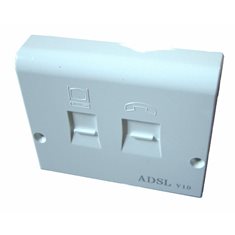
NTE5 adsl replacement faceplate
- Probably the thing most likely to provide improvements is to change the front plate of your NTE5 socket to an adsl front plate. These replacement faceplates have the adsl filter built inside them and they filter the broadband signal before it enters your house wiring thus providing the cleanest broadband signal possible. They also remove the need to have adsl filters in all of your other sockets but they necessitate your router being in the same room
Exchange Upgrade
If none of these tips help you to improve your broadband speed then the only thing to do is wait for your exchange to be upgraded. You never know, you might be lucky enough to get a fiber cabinet in your neighbourhood. This has the effect of moving next door to the telephone exchange and the only copper wires you have then are the ones between your house and the cabinet, thus greatly reducing your line length and resultant degradation of your broadband signal.
I would love to hear your comments on this post.